¶ Checkins
¶ Overview
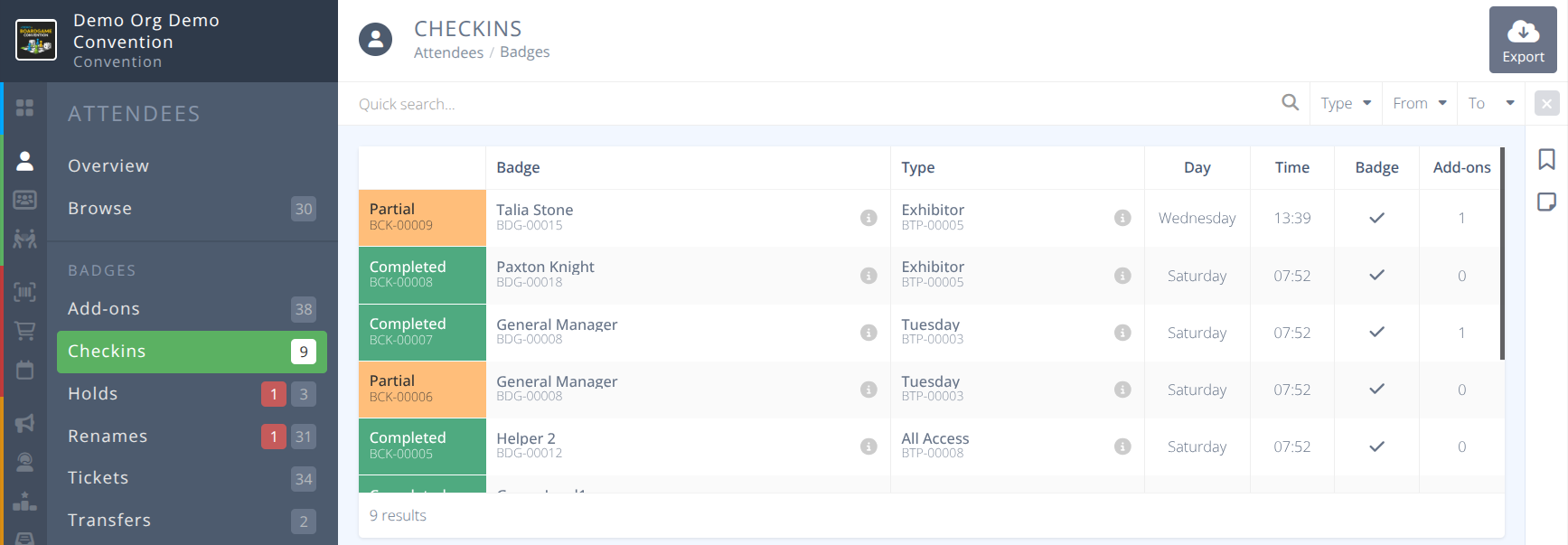
View and sort the records of all checkins. This page logs all records of checkins being completed via the checkin assistant. It does not provide a badge level view of if all items have been collected or not. Clicking on a row in the grid will take you to the detailed badge view of the attendee. The number in the menu shows the number of checkins performed via the assistant.
¶ Common Procedures
¶ Fields

Badge- The name and badge number of the attendeeStatus- The status of this specific checkin, either:
Partial - At the time of the checkin some items remained to be collected.
Completed - At the time of the checkin all available items were collected. Note: The status reflects the items available at time of checkin and does not reflect the overall checkin status of the attendee. To see if items remain to be picked up refer to the
 Add-onsgrid.Type- The type of the attenddees badgeDay- The day the last checkin was performed against the attendee.Time- The time the last checkin was performed against the attendee.Badge- Checked if the badge has been picked up by the attendee.Add-ons- The number of add-on items picked up by the attendee.
¶ Procedures
¶ Export Checkin Records
- Filter the list of checkin records using the Quick search and supplied filters as needed.
- Click the button in the actions area.
- Select the fields to be exported and if column names should be included in the side panel.
- Click to export a csv of the visible records.
¶ View Detailed Pick Up Status of Attendee Items
Attendee Browsemenu and theCheckin Assistant
- Locate the attendee you wish to view details on using the filters and quick search as needed.
- Click on the row of the attendee and you will be redirected to the Detailed View of the attendees badge.
- Select the Add-ons tab to view all add-ons and if and when they were collected.