¶ Settings
¶ Overview
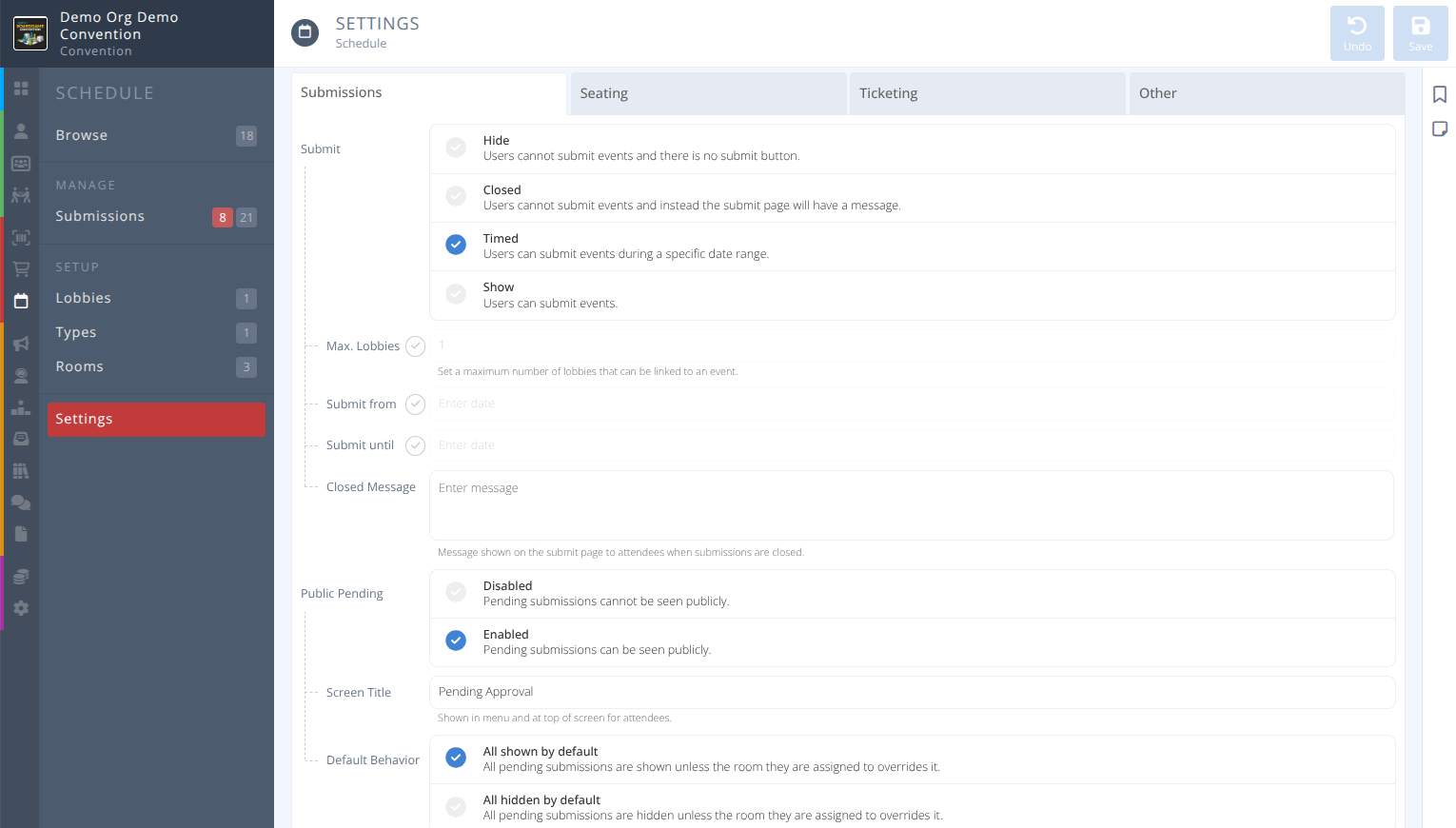
The Schedule settings determine how the convention will handle event submissions, seating, ticketing, lobby visibility, and specify who your moderators are.
¶ Fields
Select the tab below that corresponds with the tab in the manage interface:
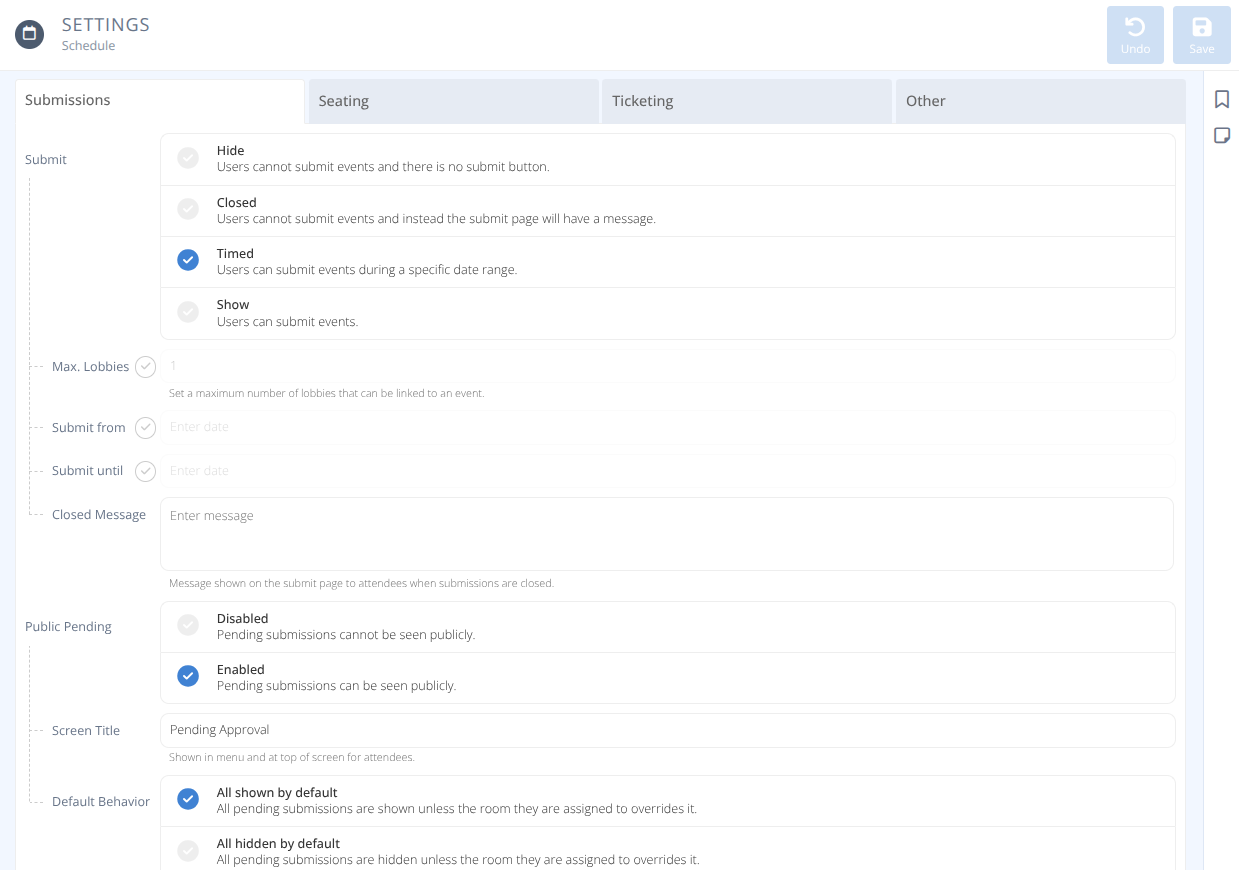
How are attendee submissions handled.
-
Submit- How are event submissions handled, either:
Hide - Users cannot submit events and there is no submit button in the my.cbe interface.
Closed - Users cannot submit events and instead the submit page will have the closed message specified below displayed.
Timed - Users can submit events during a specific date range. Outside of that range the closed message specified below will be displayed.
Show - Users can submit events.Max Lobbies(optional) - If checked, the maximum number of lobbies that can be linked to an event.Submit from(optional) - If checked, the starting date and time when users can submit events.Submit until(optional) - If checked, the ending date and time after which users can no longer submit events.Closed Message- The message displayed when submissions are closed either due to being outside the date range or the status being set to closed.
-
Public Pending- The visibility of submissions that have not yet been approved, either:
Disabled - Pending submissions are not seen publicly.
Enabled - Pending submissions can be seen publicly.Screen Title- The title of the menu showing pending submissionsDefault Behavior- Either:
All shown by default - All pending submissions are shown unless the room they are assigned to overrides it.
All hidden by default - All pending submissions are hidden unless the room they are assigned to overrides it.
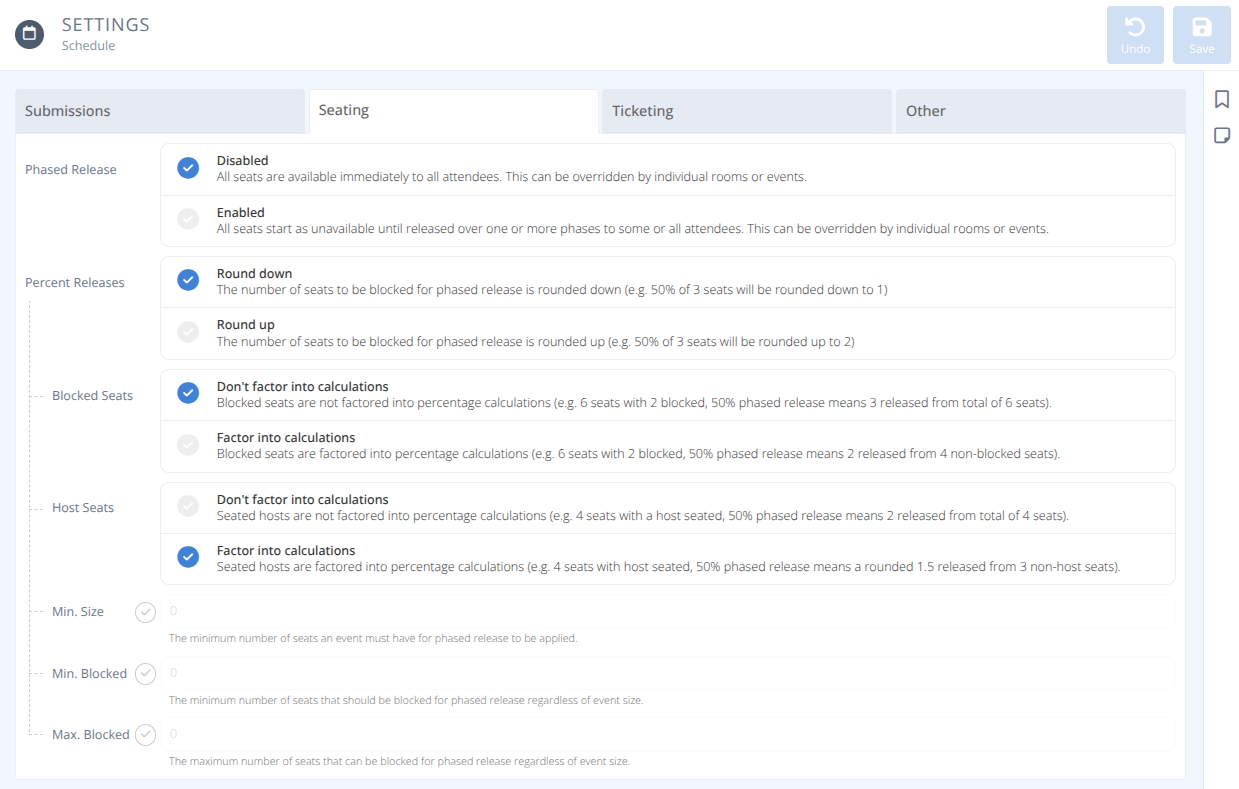
Determine how the convention will release seats in general, and how to calculate the number of seats to block if using phased at the convention, room, and event level.
-
Phased Release- Are seats released in blocks, either:
Disabled - All seats are immediately available to all attendees. This can be overridden by individual rooms or events.
Enabled - All seats start as unavailable until released over one or more phases to some or all attendees. This can be overridden by individual rooms or events.

Phases- A list of phases that specify at a selecteddate & timerelease a%of seats and allowselected attendeesto join events.Notice- The message displayed to attendees when seats are currently blocked.
-
Percent Releases
Round down - The number of seats to be blocked for phased release is rounded down (e.g. 50% of 3 seats rounded down = 1 seat)
Round up - The number of seats to be blocked for phased release is rounded up (e.g. 50% of 3 seats rounded up = 2 seats)Blocked Seats
Don't factor into calculations - Manually blocked seats are not factored into percentage calculations (e.g. 6 seats with 2 manually blocked, 50% phased release = 3 released from total of 6 seats)
Factor into calculations - Manually blocked seats are factored into percentage calculations (e.g. 6 seats with 2 manually blocked, 50% phased release = 2 released from 4 non-blocked seats)Host Seats
Don't factor into calculations - Seated hosts do not factor into percentage calculations (e.g. 4 seats with host seated, 50% phased release = 2 released from total of 4)
Factor into calculations - Seated hosts are factored into percentage calculations (e.g. 4 seats with host seated, 50% phased release = 1.5 rounded as specified are released from 3 non-host seats)Min. Size(optional) - If selected, the minimum number of seats an event must have for the phased release to apply.Min Blocked(optional) - If selected, the minimum number of seats that should be blocked for phased release regardless of event size.Max. Blocked(optional) - If selected, the maximum number of seats that should be blocked for phased release regardless of event size.
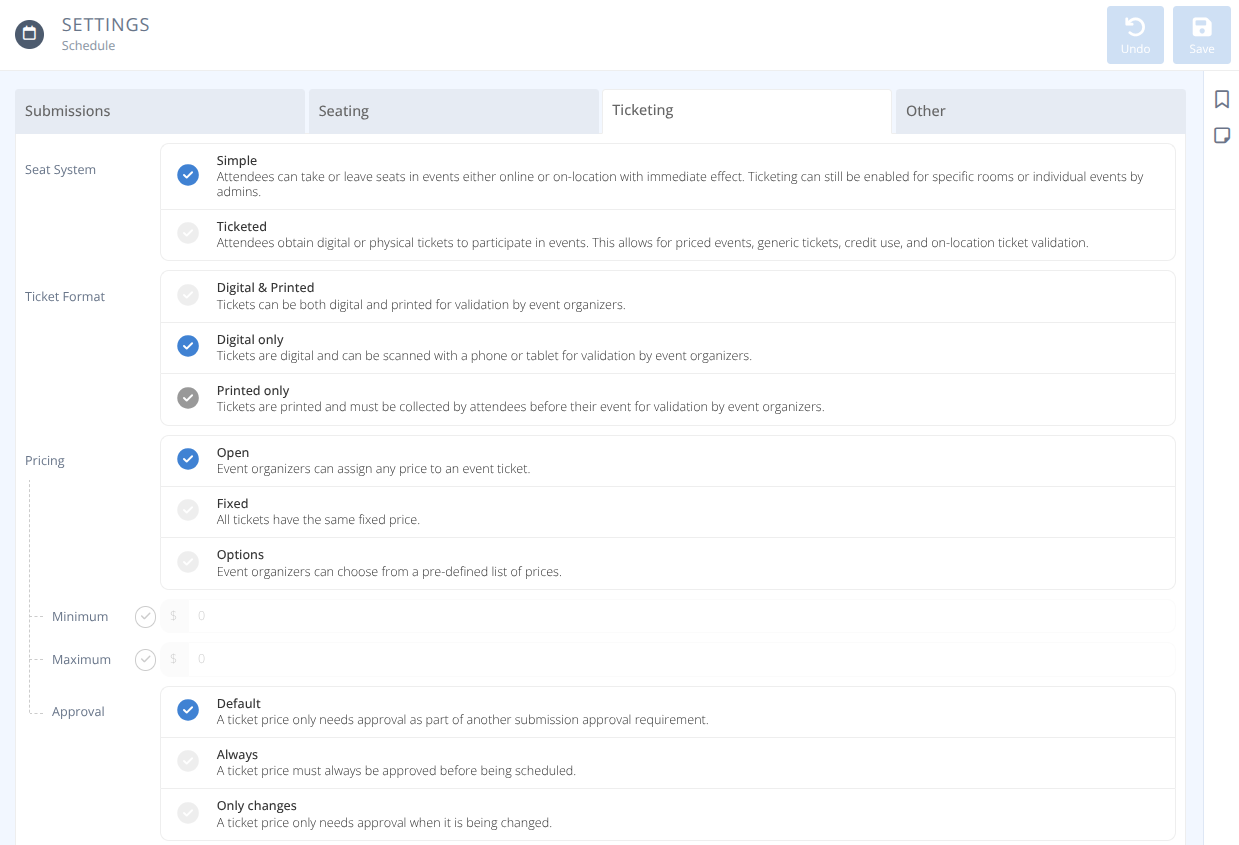
How the convention will handle ticketed events.

-
Seat System- The default handling of events at this convention, either:
Simple - Attendees can take or leave seats in events either online or on-location with immediate effect. Ticketing can still be enabled for specific rooms or individual events by admins.
Ticketed - Attendees obtain digital or physical tickets to participate in events. This allows for priced events, generic tickets, credit use, and on-location ticket validation through the app.Allow Free- When events are by default ticketed can tickets be free, either:
Disabled - Tickets must have a price.
Enabled - Tickets can be freeAllow Simple- When events are by default ticketed when can event hosts create unticketed events, either:
Disabled - Tickets must always be used even if an event is free.
Free Events Only - Tickets can be disabled by an event organizer if an event is free.
-
Ticket Format- What format do tickets take, either:
Digital & Printed - Tickets can be both digital and printed for validation by event organizers.
Digital Only - Tickets are digital and can be scanned in the app for validation by event organizers.
Printed only - Tickets are printed and must be collected by attendees before their event for validation by event organizers. -
Pricing- How are ticket prices determined, either:
. Open - Event organizers can set any price to an event ticket
-Minimum(optional) - When ticket pricing is open, the minimum price of a ticket
-Maximum(optional) - When ticket pricing is open, the maximum price of a ticket
. Fixed
-Price- The cost of a ticket.
. Options
-Prices- A list of possible ticket prices.Approval- A ticket price needs approval under these circumstances:
Default - A ticket price only needs approval as part of another submission approval requirement.
Always - A ticket price must always be approved before the event is scheduled.
Only Changes - A ticket price only needs approval when it is being changed.
-
Checkout- Is a basket used to purchase tickets, either:
Disabled - Attendees obtain tickets on an event by event basis.
Required - Attendees add one or more tickets to their basket before checking out.
Optional - Attendees can obntain tickets on an event by event basis or add multiple to their basket before checking out.Purchase- What methods are accepted for purchasing tickets, either:
All methods - Attendees can use their payment card, credit, or generic tickets to obtain event tickets.
Payment only - Attendees can only use a payment card or credit to obtain event tickets. Generic tickets are not used.
Redemption only - Attendees can only use generic tickets to redeem against event tickets.
-
Convention Fee- Is an additional fee taken from ticket sales, either:
None - There is no fee taken from a ticket sale.
Fixed - There is a fixed fee taken from a ticket sale.Amount- The dollar amount of the fee.
Percentage - There is a percentage fee taken from a ticket sale.Amount- The percentage of the ticket price taken as a fee.
-
Refunds- How are refunds handled, either:
Full Amount - Attendees receive the value of the ticket and the convention covers any associated platform fees.
Net amount after platform fees - Attendees receive the value of the ticket after any associated platform fees. If there were no fees, such as when a ticket is comped, then it will be a full refund.
Percent - Attendees receive a percentage of the value of the ticket.Amount- The percentage of the ticket value to return to the attendee on a refund.
No refund - Attendees do not receive any refund for tickets.Method- How are refunds processed, either:
Credit - Attendees receive their refund as credit to use in the Store
Payment - Attendees receive their refund via the original payment method. If they did not pay directly, such as when a ticket is comped or bundled, it will be given as credit.
-
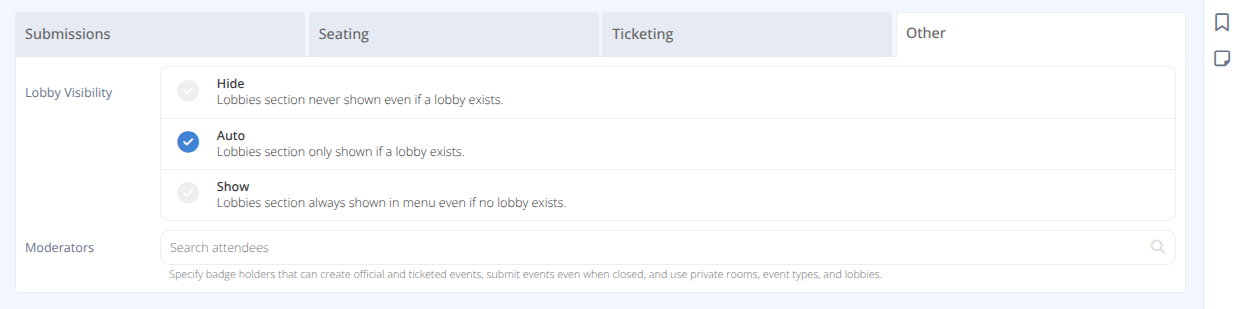
Lobby Visibility- How are lobbies used at the convention, either:
Auto - The lobbies section is only shown if a lobby exists.
Hide - The lobbies section is never shown even if a lobby exists.
Show - The lobbies section is always shown in the menu even if no lobby exists. -
Moderators- A list of badge holders that can create official and ticketed events, submit events even when closed, and use private rooms, event types, and lobbies.