¶ Settings
¶ Overview
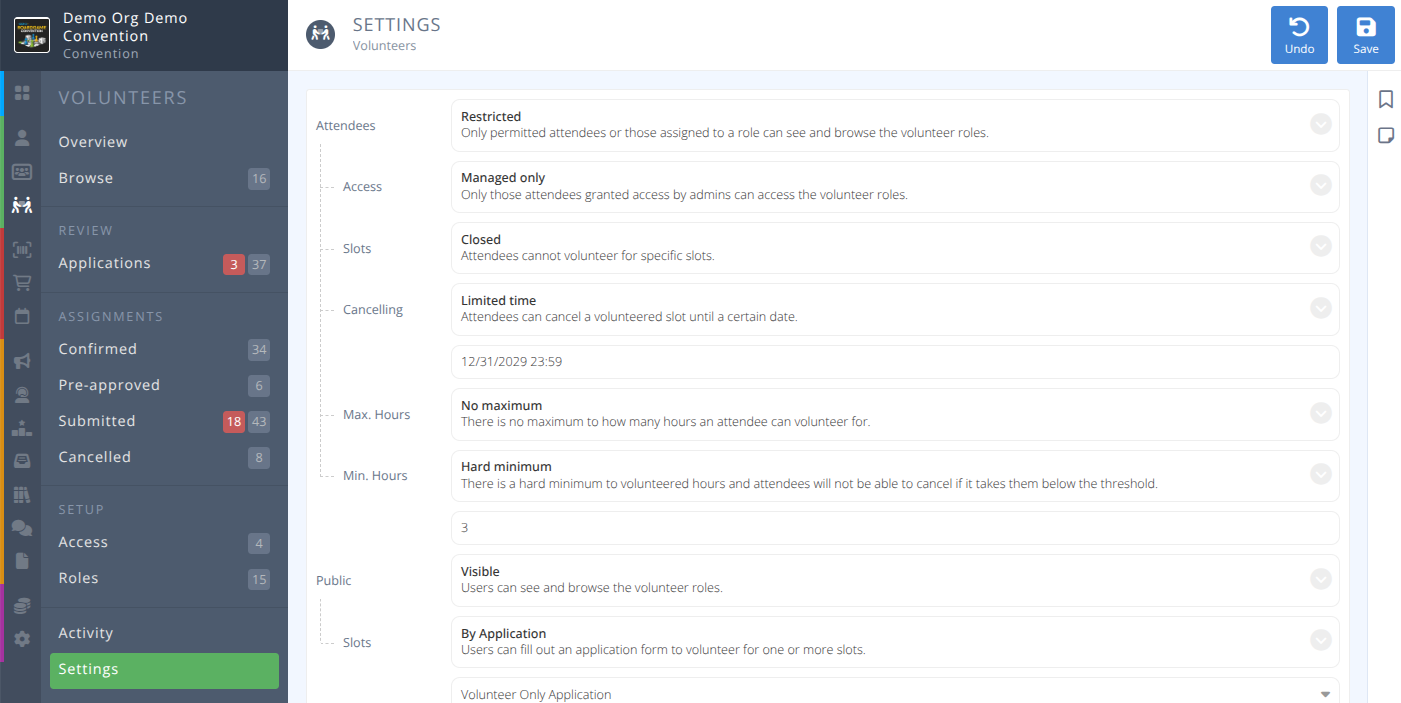
The settings page allows you to determine who can see the Volunteer section in the application, who and how do people volunteer for slots, as well as terms for cancelling or leaving a shift.
¶ Fields

Attendees- The visibility of the Volunteering section to attendees, either:- Hidden (default) - No attendees can see and browse the volunteer roles.
- Restricted - Only permitted attendees or those assigned to a role can see and browse the volunteer roles.
- Visible - All attendees can see and browse the volunteer roles.
Public- The visibility of the Volunteering section to non badgeholders (i.e. the public)- Hidden (default) - Non-badgeholders cannot see or browse the volunteer roles.
Slots- Access to volunteer slots to the public is either Closed or By application
- Visible - Non-badgeholders can see and browse the volunteer roles.
- Hidden (default) - Non-badgeholders cannot see or browse the volunteer roles.
Pending Assignments- How pending assignments effect capacity of a volunteer slot either:- Doesn't reduce available capacity (default)- A pending assignment does not reduce the capacity of the selected volunteer slot.
- Reduces available capacity - Pending assignments do reduce the capacity of the selected volunteer slot.
¶ Sub-Fields
¶ Available When Attendees = Restricted
Access- How is access provided to attendees, either:- Managed Only - Only those granted access by admins can access the Volunteering section
- By application - Select the application form from the dropbox.
¶ Available When Attendees = Restricted or Visible
Slots- What access do attendees have to slots, either:- Closed
- By Application
- Open
Cancelling- When can volunteers cancel their assigned slot, either:- Disbaled - Volunteers cannot leave assigned slots themselves only admins can do so
- Limited Time - Volunteers can leave assigned slots up to a specified date and time
- Anytime - Volunteers can cancel their assigned slots at any time
Max Hours- How many hours can a volunteer sign up for, either:- No maximum - There is no limit
- Soft maximum - The volunteer is warned when exceeding the number, but may still add the chosen slot
- Hard maximum - The volunteer cannot add a slot if it exceeds the specified number
Min Hours- How many hours must a volunteer maintain in their slots, either:- Disabled - Volunteers can cancel or leave shifts regardless of number of hours
- Soft minimum - Volunteers are warned if cancelling a shift takes them below the specified number of hours
- Hard minimum - Volunteers are prevented from cancelling a shift if it takes them below the specified number of hours