¶ Settings
¶ Overview
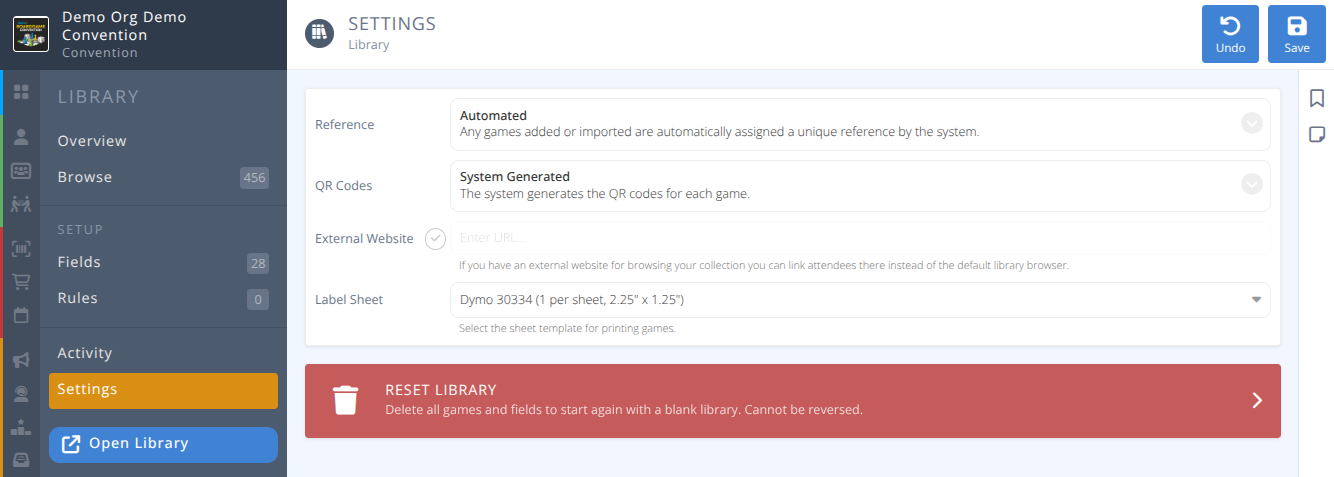
The library settings allow you to detemine how items are identified and how labels are created and printed for each item in the library.
¶ Fields

-
Reference- The unique reference to identify the item in the library, either:
Automated (Default option) - Any games added or imported are automatically assigned a unique reference by the system.
Provided - You provide the unique reference for each game when adding or importing (e.g. BGG Collection ID) Note: Be sure each reference is unique. For example if you have two copies of a game and are providing the BGG ID as the reference append each one with a "-" and the number of the copy.
 -
QR Codes- How are QR codes handled for the library, either:
System Generated (Default option) - The system generates QR codes for each game.
External Reference - Your own unique reference for the game is used for the QR codes.
Provided Code - You have an additional field when you import games that is used for QR codes. -
External Website- If selected a link to your external website will replace the default library browser. Please use the full https:// format for the link. -
Label Sheet- The template used for printing the library labels, either:
Avery 5160 (30 per sheet, 1" x 2.625")
Dymo 30321 (1 per sheet, 1.4" x 3.5")
Dymo 30334 (1 per sheet, 2.25" x 1.25")
Dymo 30336 (1 per sheet, 1" x 2.125")
¶ Reset Library
Warning: Resetting the library will delete all games and fields and take you back to a blank library. This cannot be reversed.