¶ Submissions
¶ Overview
This is where you'll find the data collected from your forms.
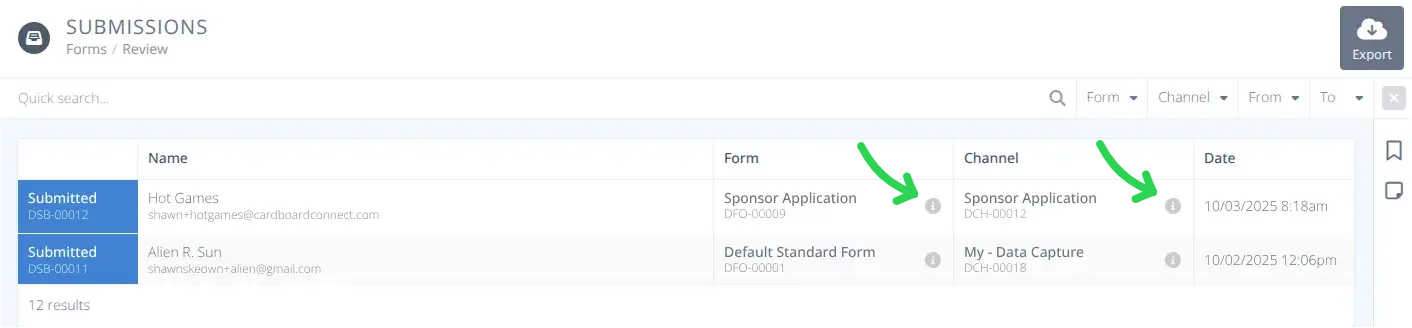
You can view the collected information, the Form it came from, and the Channel that used that Form.

The quick search allows for filtering the results by Name. Additional Filters are provided to specify specific a Form, Channel, and From and To submission dates.
The info buttons  will display information on the Form or Channel.
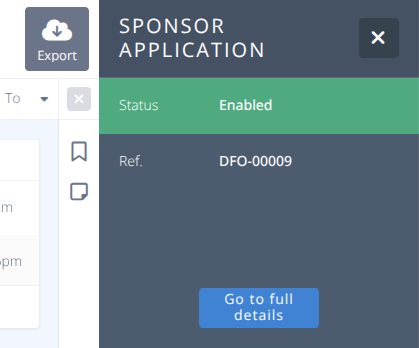
For Forms specifically you can then click to jump to that Form
¶ Common Procedures
View the Submission DetailsView the Form Connected to a SubmissionExport a CSV of Data Obatained from a Form and/or Channel on Chosen Days
¶ Fields
Name- The Name and email address of the person who submitted the formForm- The Name and unique identifier of the Form that collected the dataChannel- The Page Name and unique identifier for the Channel that collected the dataDate- The date and time the data was collected
¶ Procedures
¶ View the Submission Details
-
Click on the row to display the data collected.
-
All questions and answers submitted will be displayed
¶ View the Form Connected to a Submission
-
Click on the info button
in the Form column of the row or details screen to display the side panel containing the details of the Form associated with the data. -
Click on the Go to full details button to jump to the associated Form
¶ Export a CSV of Data Obatained from a Form and/or Channel on Chosen Days
-
Filter the data using the Quick search..., Form, Channel, From, To selectors on the filter row
-
Click the Export button in the top right.
-
De-select any Columns you do not want in the export
-
If you do not want Column Names to be included de-select that option.
-
Click Generate & download